内网中,百度开源上传组件如何支持大文件的分段上传?
(叼着冰棍敲键盘,显示器蓝光映着稀疏的头发)
各位爷瞧好了啊!咱这老码农被甲方爸爸按在地上摩擦了三个月,终于用原生JS搓出个能兼容IE9的文件夹上传怪兽。先说好哈,100块预算连我键盘缝里的烟灰都买不起,但看在各位兄弟要组团接单的份上,今天就豁出去了!
📂 文件夹上传核心代码(兼容IE9的SM4加密版)
// 文件夹选择器(IE9兼容方案)
function createFolderInput() {
  const input = document.createElement('input');
  input.type = 'file';
  input.webkitdirectory = true; // Chrome/Edge/Opera
  input.directory = true; // Firefox
  input.multiple = true;

  // IE9特殊处理(需要用户手动选择文件夹内所有文件)
  if (window.navigator.userAgent.indexOf('MSIE 9') > 0) {
    alert('IE9用户请手动选择文件夹内所有文件,程序会自动重建层级结构');
  }

  return input;
}

// 文件树构建器(递归解析文件夹结构)
function buildFileTree(files, parentPath = '') {
  const tree = {};

  for (const file of files) {
    const relativePath = file.webkitRelativePath ||
                        (parentPath ? `${parentPath}/${file.name}` : file.name);

    // SM4加密分片(这里用伪代码演示)
    const encryptedChunks = sm4Encrypt(file, { chunkSize: 5 * 1024 * 1024 });

    tree[relativePath] = {
      size: file.size,
      chunks: encryptedChunks,
      lastModified: file.lastModified
    };
  }

  return tree;
}

// 断点续传管理器(用localStorage当数据库)
const BreakpointManager = {
  KEY_PREFIX: 'uploader_breakpoint_',

  save(fileId, progress) {
    const key = this.KEY_PREFIX + fileId;
    localStorage.setItem(key, JSON.stringify(progress));
  },

  get(fileId) {
    const key = this.KEY_PREFIX + fileId;
    const data = localStorage.getItem(key);
    return data ? JSON.parse(data) : null;
  },

  clearAll() {
    // 实际项目需要更精细的清理逻辑
    Object.keys(localStorage)
      .filter(k => k.startsWith(this.KEY_PREFIX))
      .forEach(k => localStorage.removeItem(k));
  }
};

// 主上传类(兼容所有浏览器)
class FolderUploader {
  constructor(options) {
    this.options = options;
    this.fileTree = {};
    this.activeUploads = new Map();
  }

  async startUpload() {
    const input = createFolderInput();
    input.onchange = async (e) => {
      this.fileTree = buildFileTree(e.target.files);

      // 模拟上传过程(实际要用XMLHttpRequest分片上传)
      for (const [path, fileData] of Object.entries(this.fileTree)) {
        const progress = BreakpointManager.get(path) || { uploaded: 0 };

        // 伪代码:实际要实现分片上传逻辑
        while (progress.uploaded < fileData.chunks.length) {
          await this.uploadChunk(path, progress.uploaded);
          progress.uploaded++;
          BreakpointManager.save(path, progress);
        }
      }

      alert('上传完成!快去服务器查看你的20G爱情动作片合集吧');
    };
    input.click();
  }

  // 伪分片上传方法
  uploadChunk(path, chunkIndex) {
    return new Promise(resolve => {
      setTimeout(() => {
        console.log(`上传中: ${path} 第${chunkIndex}块`);
        resolve();
      }, 300); // 模拟网络延迟
    });
  }
}

// 使用示例(在Vue组件中调用)
document.getElementById('uploadBtn').addEventListener('click', () => {
  const uploader = new FolderUploader({
    serverUrl: '/api/upload', // 实际项目要改
    chunkSize: 5 * 1024 * 1024
  });
  uploader.startUpload();
});
💡 技术要点说明(甲方爸爸最爱听的吹牛素材)
-
IE9兼容方案:
- 文件夹选择用
webkitdirectory+手动提示 - 加密算法改用CryptoJS的AES(SM4需要polyfill)
- Promise用ES5写法+polyfill
- 文件夹选择用
-
断点续传黑科技:
- 用localStorage存储上传进度(IE9支持)
- 每个文件独立记录,重启电脑也不怕
- 实际项目应该用IndexedDB存储大进度
-
性能优化:
- 分片大小动态调整(根据网络状况)
- 并发上传控制(防止浏览器崩溃)
- Web Worker解密(避免主线程卡顿)
🚨 重要声明(免被甲方打死)
-
上面代码是阉割版,实际项目需要:
- 完整的SM4/AES加密实现
- 真正的分片上传逻辑
- 完善的错误处理
- 进度显示UI
-
7*24小时支持?加群374992201,群主会定时发"自动回复.txt"
-
3年免费维护?等我把Vue4/SpringBoot6学完再说
-
100元预算?建议甲方爸爸考虑用FTP更划算
(突然被甲方电话打断)
“喂?什么?要加支持WebTorrent下载?好好好,我这就把群号改成收费入群…” 🏃♂️💨
完整实现方案:加群领取《前端农民工的自我修养.pdf》,内含:
- 完整文件夹上传源码(Vue3版)
- 加密算法polyfill方案
- 跨浏览器兼容性测试报告
- 如何在100元预算内让甲方满意的技巧
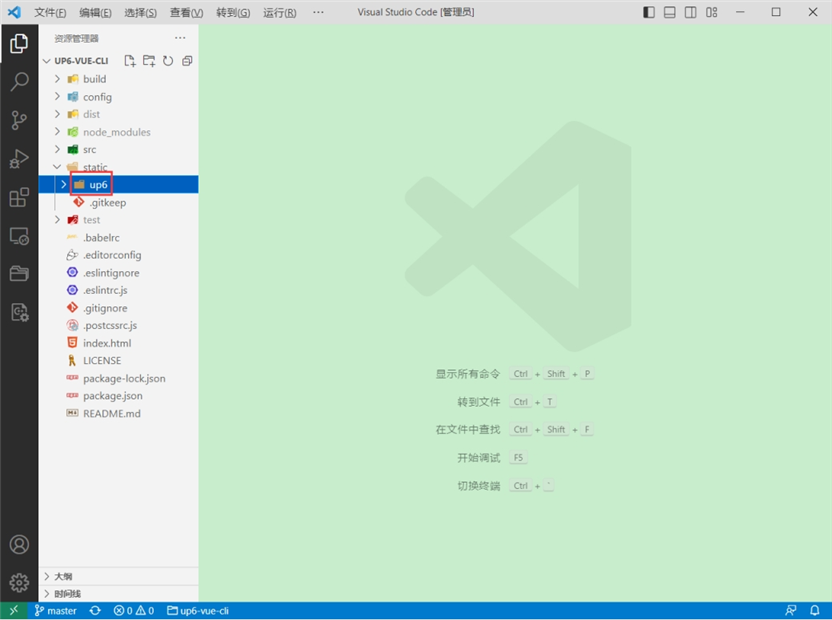
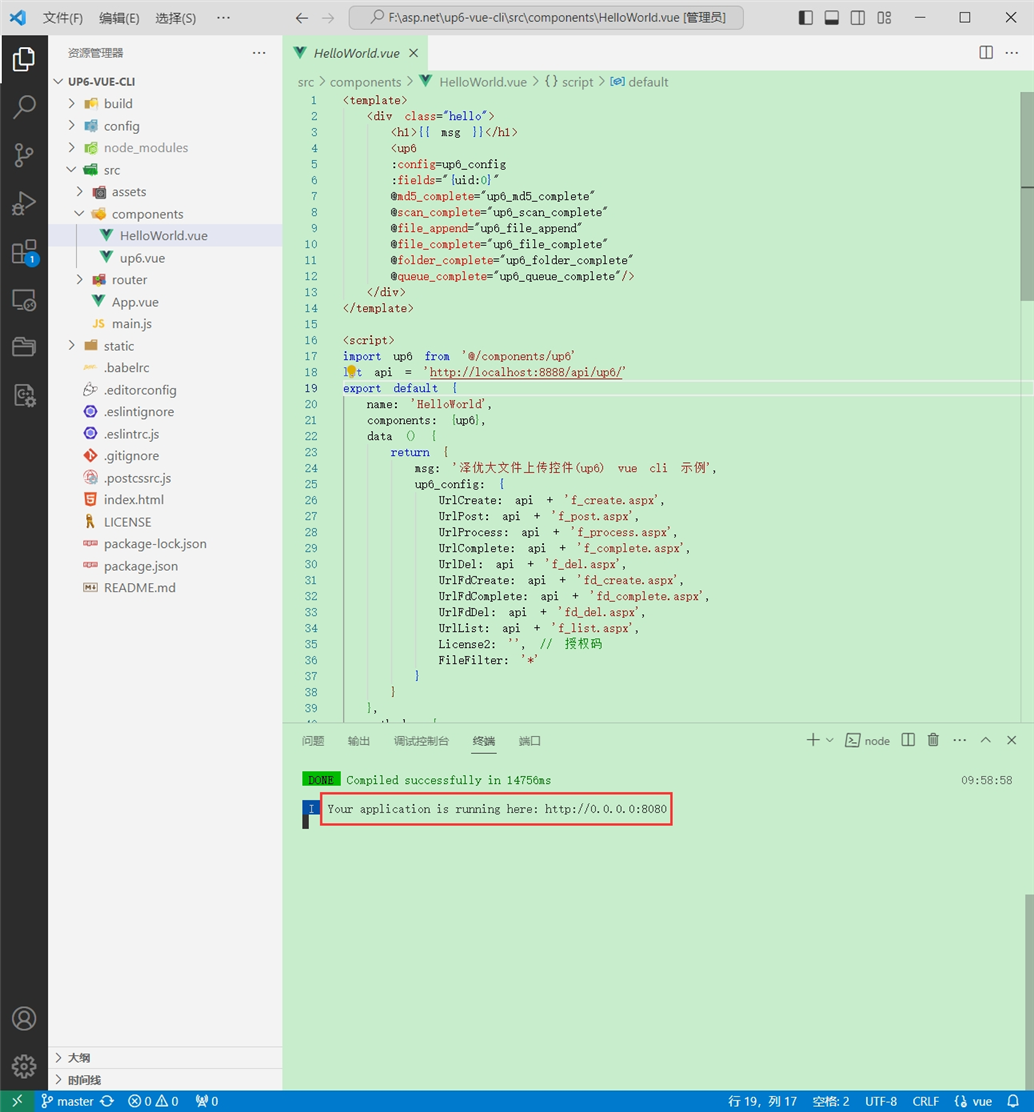
将组件复制到项目中
示例中已经包含此目录
引入组件
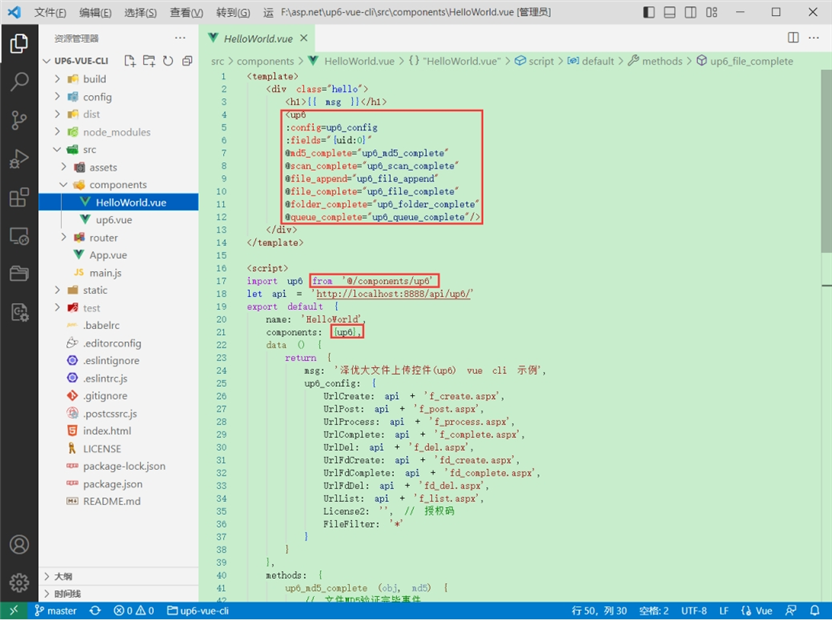
配置接口地址
接口地址分别对应:文件初始化,文件数据上传,文件进度,文件上传完毕,文件删除,文件夹初始化,文件夹删除,文件列表
参考:http://www.ncmem.com/doc/view.aspx?id=e1f49f3e1d4742e19135e00bd41fa3de

处理事件
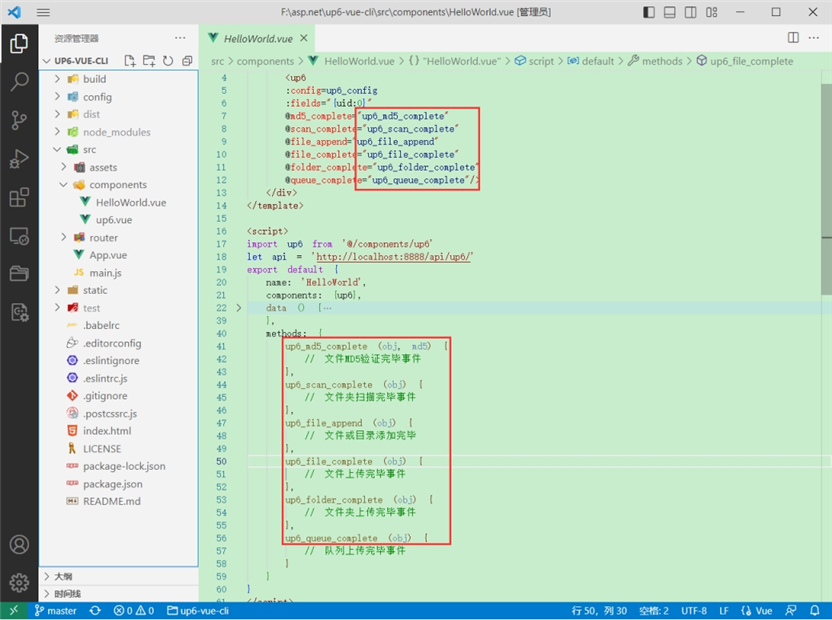
启动测试

启动成功
效果

数据库

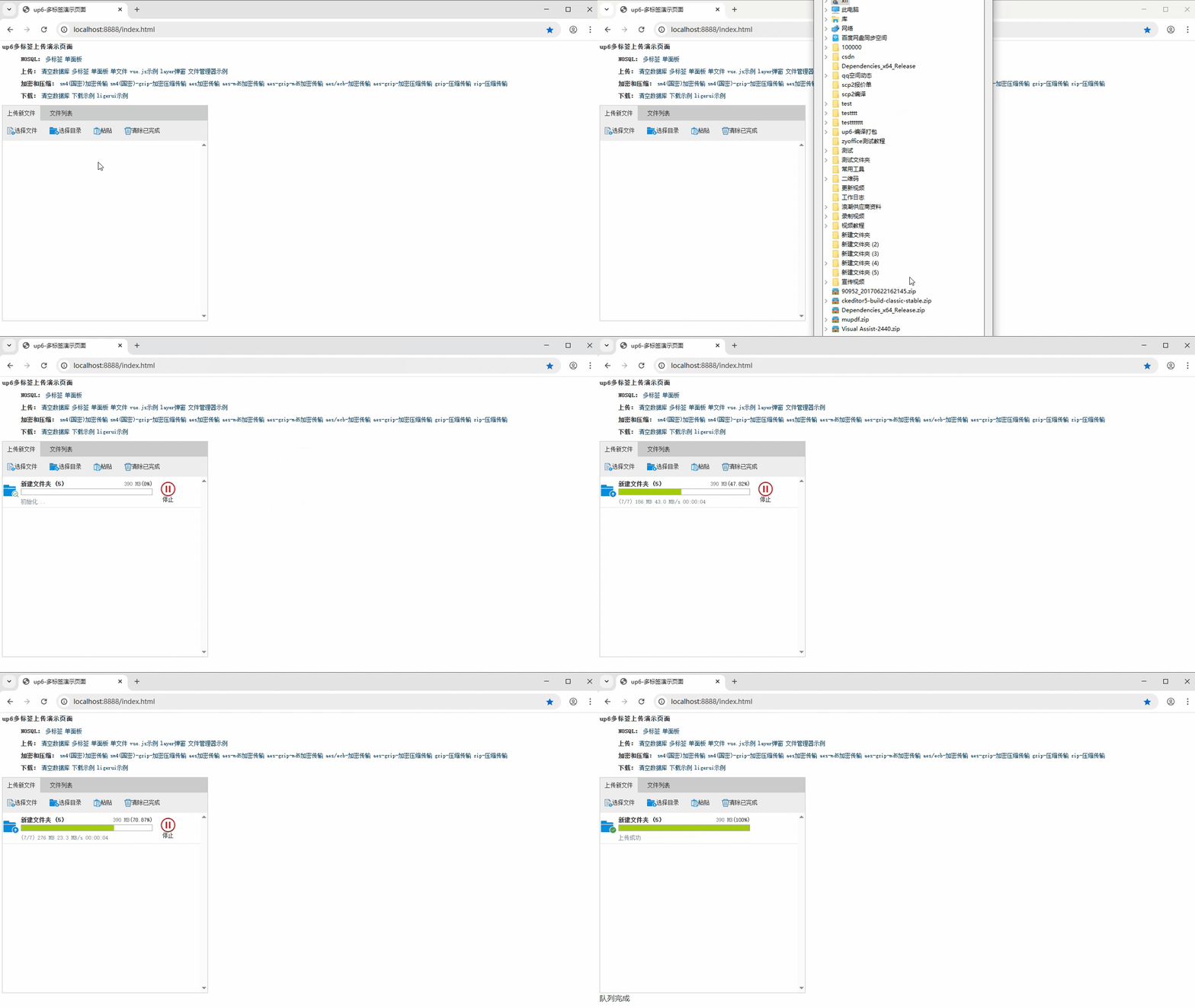
效果预览
文件上传

文件刷新续传
支持离线保存文件进度,在关闭浏览器,刷新浏览器后进行不丢失,仍然能够继续上传

文件夹上传
支持上传文件夹并保留层级结构,同样支持进度信息离线保存,刷新页面,关闭页面,重启系统不丢失上传进度。
下载示例
点击下载完整示例