
一、安装WSL 1.1 准备工作 (1)在搜索栏搜索“启用或者关闭windows功能”。 (2)选择“Hyper-V"、"(Virtual Machine Platform

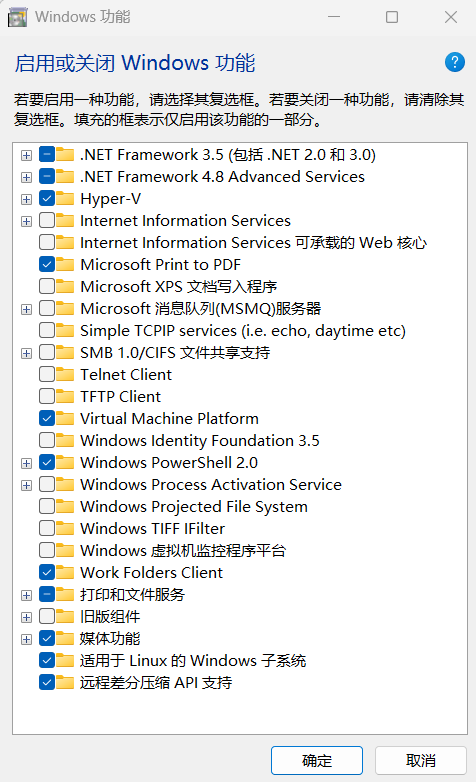
一、安装WSL 1.1 准备工作 (1)在搜索栏搜索“启用或者关闭windows功能”。 (2)选择“Hyper-V"、"(Virtual Machine Platform

一、安装WSL 1.1 准备工作 (1)在搜索栏搜索“启用或者关闭windows功能”。 (2)选择“Hyper-V"、"(Virtual Machine Platform

一、安装WSL 1.1 准备工作 (1)在搜索栏搜索“启用或者关闭windows功能”。 (2)选择“Hyper-V"、"(Virtual Machine Platform

文章目录 前言 一、本地电脑网络设置 1.电脑左下角搜索【控制面板】,然后点击打开 2.点击【网络和internet】 3.点击【网络和
引用:https://www.ejiadc.cn/2024/07/1719831104322 提示:配置链路聚合/端口聚合时,交换机和电脑之间只能有一根网线相连,否
