【运维】统信UOS操作系统aarch64自制OpenSSH 9.6p1 rpm包(含ssh-copy-id命令)修复漏洞
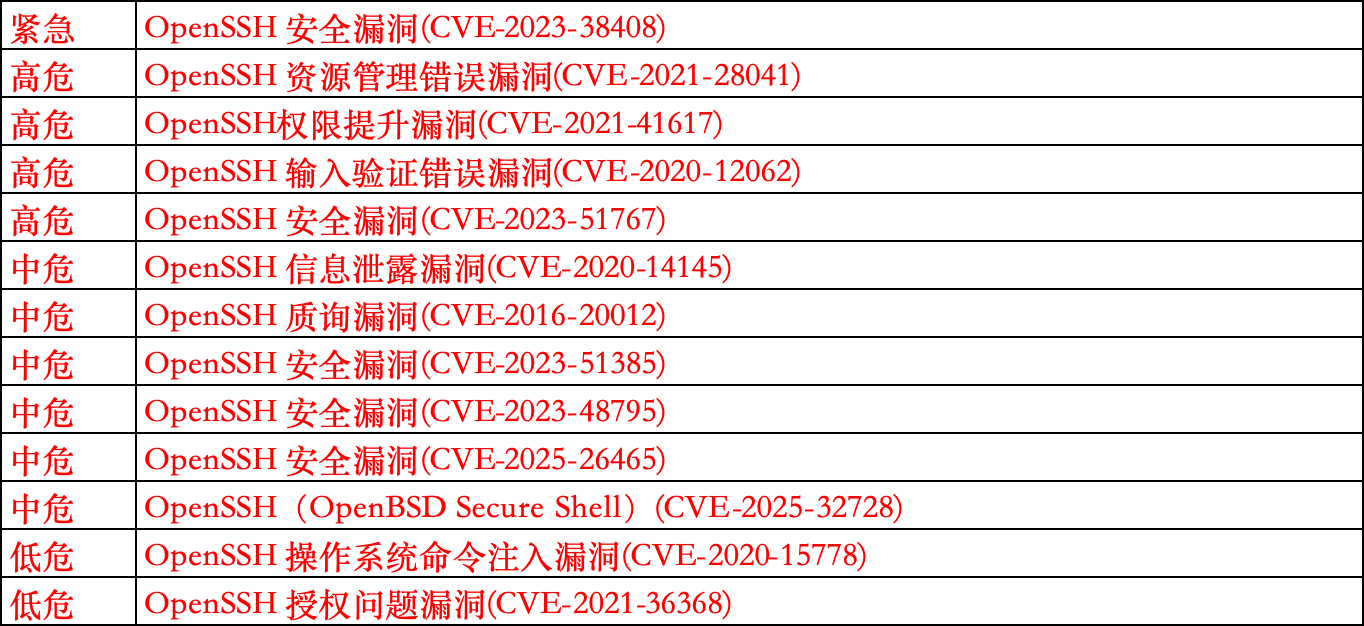
为修复如下OpenSSH漏洞,openssh从8.2升级至9.6,然而并未找到统信9.6的rpm源,所以自己动手制作,折腾了一天,在此记录一下
一、准备工作
1、检查版本
cat /etc/os-release

uname -a
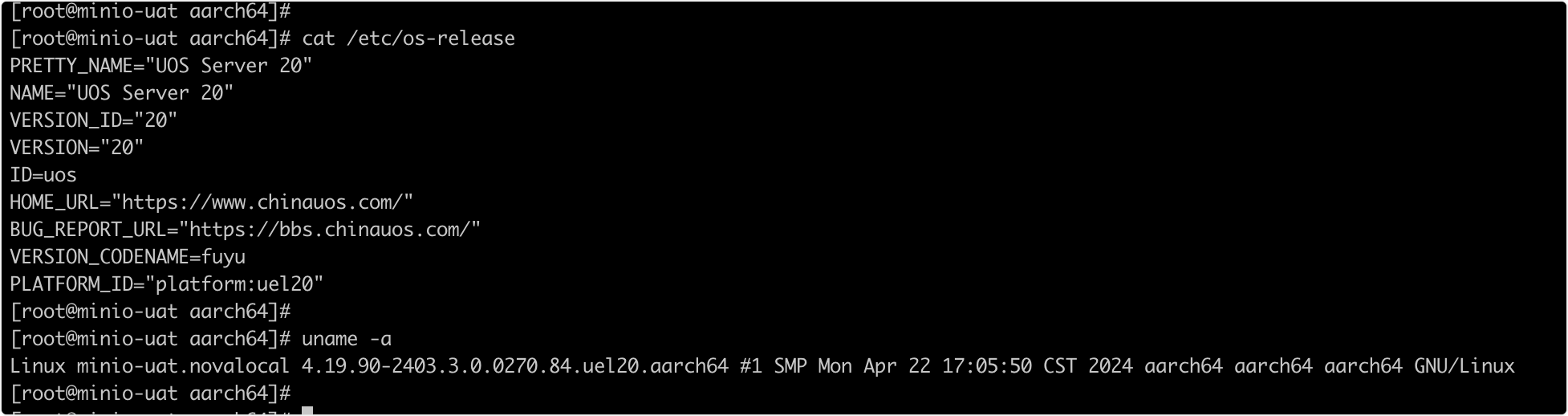
如图当前环境为aarch64架构,在其中一台制作rpm包,之后传到别的服务器执行安装即可
2、rpmbuild构建工具安装
# 安装RPM构建工具和依赖
yum install -y rpm-build rpmdevtools wget gcc make zlib-devel openssl-devel pam-devel libXt-devel libX11-devel
设置 RPM 构建环境:
# 创建RPM构建目录结构
rpmdev-setuptree
3、下载源码和准备.spec 文件
# 下载OpenSSH源码
wget -P ~/rpmbuild/SOURCES https://cdn.openbsd.org/pub/OpenBSD/OpenSSH/portable/openssh-9.6p1.tar.gz
# 备用,与上面一样的
wget -P ~/rpmbuild/SOURCES https://mirrors.aliyun.com/pub/OpenBSD/OpenSSH/portable/openssh-9.6p1.tar.gz

# 获取最新的OpenSSH spec文件,这个不一定好使,可以试着自己改一下,下面我提供一个修改好的,可以直接用
wget -O ~/rpmbuild/SPECS/openssh.spec https://src.fedoraproject.org/rpms/openssh/raw/rawhide/f/openssh.spec

# 下载x11-ssh-askpass源码,这个rpm包里是不需要的,但是没有会报错
wget -P ~/rpmbuild/SOURCES https://src.fedoraproject.org/repo/pkgs/openssh/x11-ssh-askpass-1.2.4.1.tar.gz
3.1、openssh.spec配置修改
vim /root/rpmbuild/SPECS/openssh.spec
主要关注修改版本,禁用no_x11_askpass
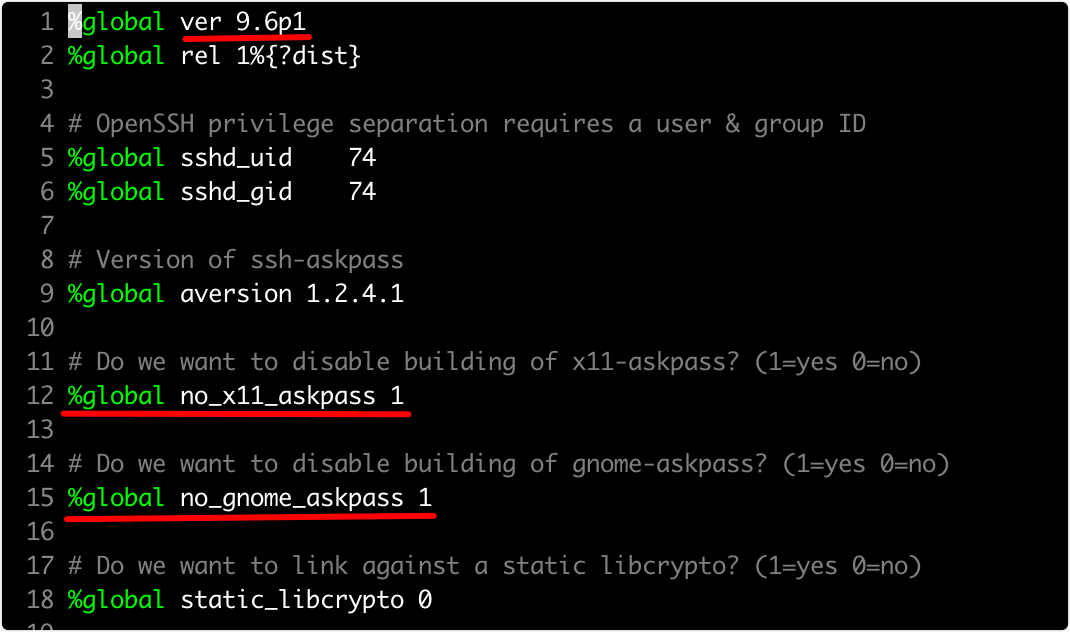
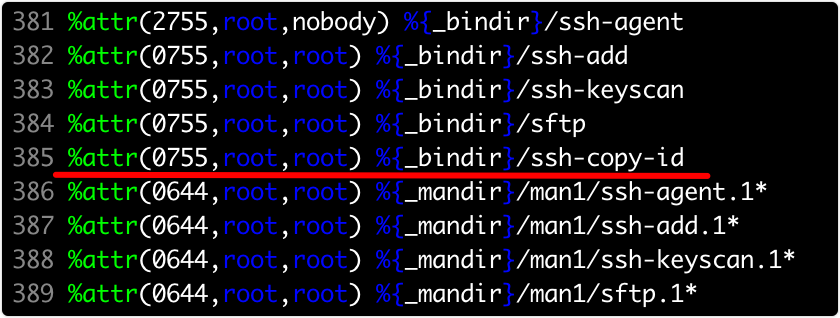
新版的openssh源码里面编译安装,已经将ssh-copy-id命令放到了子目录contrib,但是不会默认安装,而此命令在使用中比较实用,比如各主机之间的免密认证
install -m755 contrib/ssh-copy-id $RPM_BUILD_ROOT/usr/bin/ssh-copy-id

%attr(0755,root,root) %{_bindir}/ssh-copy-id
3.2、openssh.spec(已修改验证好的)
如下为验证过的统信aarch64架构版本的openssh.spec,可以直接复制使用
vim /root/rpmbuild/SPECS/openssh.spec
%global ver 9.6p1
%global rel 1%{?dist}
# OpenSSH privilege separation requires a user & group ID
%global sshd_uid 74
%global sshd_gid 74
# Version of ssh-askpass
%global aversion 1.2.4.1
# Do we want to disable building of x11-askpass? (1=yes 0=no)
%global no_x11_askpass 1
# Do we want to disable building of gnome-askpass? (1=yes 0=no)
%global no_gnome_askpass 1
# Do we want to link against a static libcrypto? (1=yes 0=no)
%global static_libcrypto 0
# Do we want smartcard support (1=yes 0=no)
%global scard 0
# Use GTK2 instead of GNOME in gnome-ssh-askpass
%global gtk2 1
# Use build6x options for older RHEL builds
# RHEL 7 not yet supported
%if 0%{?rhel} > 6
%global build6x 0
%else
%global build6x 1
%endif
%if 0%{?fedora} >= 26
%global compat_openssl 1
%else
%global compat_openssl 0
%endif
# Do we want kerberos5 support (1=yes 0=no)
%global kerberos5 1
# Reserve options to override askpass settings with:
# rpm -ba|--rebuild --define 'skip_xxx 1'
%{?skip_x11_askpass:%global no_x11_askpass 1}
%{?skip_gnome_askpass:%global no_gnome_askpass 1}
# Add option to build without GTK2 for older platforms with only GTK+.
# RedHat <= 7.2 and Red Hat Advanced Server 2.1 are examples.
# rpm -ba|--rebuild --define 'no_gtk2 1'
%{?no_gtk2:%global gtk2 0}
# Is this a build for RHL 6.x or earlier?
%{?build_6x:%global build6x 1}
# If this is RHL 6.x, the default configuration has sysconfdir in /usr/etc.
%if %{build6x}
%global _sysconfdir /etc
%endif
# Options for static OpenSSL link:
# rpm -ba|--rebuild --define "static_openssl 1"
%{?static_openssl:%global static_libcrypto 1}
# Options for Smartcard support: (needs libsectok and openssl-engine)
# rpm -ba|--rebuild --define "smartcard 1"
%{?smartcard:%global scard 1}
# Is this a build for the rescue CD (without PAM)? (1=yes 0=no)
%global rescue 0
%{?build_rescue:%global rescue 1}
# Turn off some stuff for resuce builds
%if %{rescue}
%global kerberos5 0
%endif
Summary: The OpenSSH implementation of SSH protocol version 2.
Name: openssh
Version: %{ver}
%if %{rescue}
Release: %{rel}rescue
%else
Release: %{rel}
%endif
URL: https://www.openssh.com/portable.html
Source0: https://ftp.openbsd.org/pub/OpenBSD/OpenSSH/portable/openssh-%{version}.tar.gz
Source1: http://www.jmknoble.net/software/x11-ssh-askpass/x11-ssh-askpass-%{aversion}.tar.gz
License: BSD
Group: Applications/Internet
BuildRoot: %{_tmppath}/%{name}-%{version}-buildroot
Obsoletes: ssh < %{ver}
%if %{build6x}
Requires(pre): initscripts >= 5.00
%else
Requires: initscripts >= 5.20
%endif
BuildRequires: perl
%if %{compat_openssl}
BuildRequires: compat-openssl10-devel
%else
BuildRequires: openssl-devel >= 1.0.1
#BuildRequires: openssl-devel < 1.1
%endif
BuildRequires: /bin/login
%if ! %{build6x}
BuildRequires: glibc-devel, pam
%else
BuildRequires: /usr/include/security/pam_appl.h
%endif
%if ! %{no_x11_askpass}
BuildRequires: /usr/include/X11/Xlib.h
# Xt development tools
BuildRequires: libXt-devel
# Provides xmkmf
BuildRequires: imake
# Rely on relatively recent gtk
BuildRequires: gtk2-devel
%endif
%if ! %{no_gnome_askpass}
BuildRequires: pkgconfig
%endif
%if %{kerberos5}
BuildRequires: krb5-devel
BuildRequires: krb5-libs
%endif
%package clients
Summary: OpenSSH clients.
Requires: openssh = %{version}-%{release}
Group: Applications/Internet
Obsoletes: ssh-clients < %{ver}
%package server
Summary: The OpenSSH server daemon.
Group: System Environment/Daemons
Obsoletes: ssh-server < %{ver}
Requires: openssh = %{version}-%{release}, chkconfig >= 0.9
%if ! %{build6x}
Requires: /etc/pam.d/system-auth
%endif
%package askpass
Summary: A passphrase dialog for OpenSSH and X.
Group: Applications/Internet
Requires: openssh = %{version}-%{release}
Obsoletes: ssh-extras < %{ver}
%package askpass-gnome
Summary: A passphrase dialog for OpenSSH, X, and GNOME.
Group: Applications/Internet
Requires: openssh = %{version}-%{release}
Obsoletes: ssh-extras < %{ver}
%description
SSH (Secure SHell) is a program for logging into and executing
commands on a remote machine. SSH is intended to replace rlogin and
rsh, and to provide secure encrypted communications between two
untrusted hosts over an insecure network. X11 connections and
arbitrary TCP/IP ports can also be forwarded over the secure channel.
OpenSSH is OpenBSD's version of the last free version of SSH, bringing
it up to date in terms of security and features, as well as removing
all patented algorithms to separate libraries.
This package includes the core files necessary for both the OpenSSH
client and server. To make this package useful, you should also
install openssh-clients, openssh-server, or both.
%description clients
OpenSSH is a free version of SSH (Secure SHell), a program for logging
into and executing commands on a remote machine. This package includes
the clients necessary to make encrypted connections to SSH servers.
You'll also need to install the openssh package on OpenSSH clients.
%description server
OpenSSH is a free version of SSH (Secure SHell), a program for logging
into and executing commands on a remote machine. This package contains
the secure shell daemon (sshd). The sshd daemon allows SSH clients to
securely connect to your SSH server. You also need to have the openssh
package installed.
%description askpass
OpenSSH is a free version of SSH (Secure SHell), a program for logging
into and executing commands on a remote machine. This package contains
an X11 passphrase dialog for OpenSSH.
%description askpass-gnome
OpenSSH is a free version of SSH (Secure SHell), a program for logging
into and executing commands on a remote machine. This package contains
an X11 passphrase dialog for OpenSSH and the GNOME GUI desktop
environment.
%prep
%if ! %{no_x11_askpass}
%setup -q -a 1
%else
%setup -q
%endif
%build
%if %{rescue}
CFLAGS="$RPM_OPT_FLAGS -Os"; export CFLAGS
%endif
%configure
--sysconfdir=%{_sysconfdir}/ssh
--libexecdir=%{_libexecdir}/openssh
--datadir=%{_datadir}/openssh
--with-default-path=/usr/local/bin:/bin:/usr/bin
--with-superuser-path=/usr/local/sbin:/usr/local/bin:/sbin:/bin:/usr/sbin:/usr/bin
--with-privsep-path=%{_var}/empty/sshd
--mandir=%{_mandir}
--with-mantype=man
--disable-strip
%if %{scard}
--with-smartcard
%endif
%if %{rescue}
--without-pam
%else
--with-pam
%endif
%if %{kerberos5}
--with-kerberos5=$K5DIR
%endif
%if %{static_libcrypto}
perl -pi -e "s|-lcrypto|%{_libdir}/libcrypto.a|g" Makefile
%endif
make
%if ! %{no_x11_askpass}
pushd x11-ssh-askpass-%{aversion}
%configure --libexecdir=%{_libexecdir}/openssh
xmkmf -a
make
popd
%endif
# Define a variable to toggle gnome1/gtk2 building. This is necessary
# because RPM doesn't handle nested %if statements.
%if %{gtk2}
gtk2=yes
%else
gtk2=no
%endif
%if ! %{no_gnome_askpass}
pushd contrib
if [ $gtk2 = yes ] ; then
make gnome-ssh-askpass2
mv gnome-ssh-askpass2 gnome-ssh-askpass
else
make gnome-ssh-askpass1
mv gnome-ssh-askpass1 gnome-ssh-askpass
fi
popd
%endif
%install
rm -rf $RPM_BUILD_ROOT
mkdir -p -m755 $RPM_BUILD_ROOT%{_sysconfdir}/ssh
mkdir -p -m755 $RPM_BUILD_ROOT%{_libexecdir}/openssh
mkdir -p -m755 $RPM_BUILD_ROOT%{_var}/empty/sshd
make install DESTDIR=$RPM_BUILD_ROOT
install -d $RPM_BUILD_ROOT/etc/pam.d/
install -d $RPM_BUILD_ROOT/etc/rc.d/init.d
install -d $RPM_BUILD_ROOT%{_libexecdir}/openssh
%if %{build6x}
install -m644 contrib/redhat/sshd.pam $RPM_BUILD_ROOT/etc/pam.d/sshd
%else
install -m644 contrib/redhat/sshd.pam $RPM_BUILD_ROOT/etc/pam.d/sshd
%endif
install -m755 contrib/redhat/sshd.init $RPM_BUILD_ROOT/etc/rc.d/init.d/sshd
install -m755 contrib/ssh-copy-id $RPM_BUILD_ROOT/usr/bin/ssh-copy-id
%if ! %{no_x11_askpass}
install x11-ssh-askpass-%{aversion}/x11-ssh-askpass $RPM_BUILD_ROOT%{_libexecdir}/openssh/x11-ssh-askpass
ln -s x11-ssh-askpass $RPM_BUILD_ROOT%{_libexecdir}/openssh/ssh-askpass
%endif
%if ! %{no_gnome_askpass}
install contrib/gnome-ssh-askpass $RPM_BUILD_ROOT%{_libexecdir}/openssh/gnome-ssh-askpass
%endif
%if ! %{scard}
rm -f $RPM_BUILD_ROOT/usr/share/openssh/Ssh.bin
%endif
%if ! %{no_gnome_askpass}
install -m 755 -d $RPM_BUILD_ROOT%{_sysconfdir}/profile.d/
install -m 755 contrib/redhat/gnome-ssh-askpass.csh $RPM_BUILD_ROOT%{_sysconfdir}/profile.d/
install -m 755 contrib/redhat/gnome-ssh-askpass.sh $RPM_BUILD_ROOT%{_sysconfdir}/profile.d/
%endif
perl -pi -e "s|$RPM_BUILD_ROOT||g" $RPM_BUILD_ROOT%{_mandir}/man*/*
%clean
rm -rf $RPM_BUILD_ROOT
%triggerun server -- ssh-server
if [ "$1" != 0 -a -r /var/run/sshd.pid ] ; then
touch /var/run/sshd.restart
fi
%triggerun server -- openssh-server < 2.5.0p1
# Count the number of HostKey and HostDsaKey statements we have.
gawk 'BEGIN {IGNORECASE=1}
/^hostkey/ || /^hostdsakey/ {sawhostkey = sawhostkey + 1}
END {exit sawhostkey}' /etc/ssh/sshd_config
# And if we only found one, we know the client was relying on the old default
# behavior, which loaded the the SSH2 DSA host key when HostDsaKey wasn't
# specified. Now that HostKey is used for both SSH1 and SSH2 keys, specifying
# one nullifies the default, which would have loaded both.
if [ $? -eq 1 ] ; then
echo HostKey /etc/ssh/ssh_host_rsa_key >> /etc/ssh/sshd_config
echo HostKey /etc/ssh/ssh_host_dsa_key >> /etc/ssh/sshd_config
fi
%triggerpostun server -- ssh-server
if [ "$1" != 0 ] ; then
/sbin/chkconfig --add sshd
if test -f /var/run/sshd.restart ; then
rm -f /var/run/sshd.restart
/sbin/service sshd start > /dev/null 2>&1 || :
fi
fi
%pre server
%{_sbindir}/groupadd -r -g %{sshd_gid} sshd 2>/dev/null || :
%{_sbindir}/useradd -d /var/empty/sshd -s /bin/false -u %{sshd_uid}
-g sshd -M -r sshd 2>/dev/null || :
%post server
/sbin/chkconfig --add sshd
%postun server
/sbin/service sshd condrestart > /dev/null 2>&1 || :
%preun server
if [ "$1" = 0 ]
then
/sbin/service sshd stop > /dev/null 2>&1 || :
/sbin/chkconfig --del sshd
fi
%files
%defattr(-,root,root)
%doc CREDITS ChangeLog INSTALL LICENCE OVERVIEW README* PROTOCOL* TODO
%attr(0755,root,root) %{_bindir}/scp
%attr(0644,root,root) %{_mandir}/man1/scp.1*
%attr(0755,root,root) %dir %{_sysconfdir}/ssh
%attr(0600,root,root) %config(noreplace) %{_sysconfdir}/ssh/moduli
%if ! %{rescue}
%attr(0755,root,root) %{_bindir}/ssh-keygen
%attr(0644,root,root) %{_mandir}/man1/ssh-keygen.1*
%attr(0755,root,root) %dir %{_libexecdir}/openssh
%attr(4711,root,root) %{_libexecdir}/openssh/ssh-keysign
%attr(0755,root,root) %{_libexecdir}/openssh/ssh-pkcs11-helper
%attr(0755,root,root) %{_libexecdir}/openssh/ssh-sk-helper
%attr(0644,root,root) %{_mandir}/man8/ssh-keysign.8*
%attr(0644,root,root) %{_mandir}/man8/ssh-pkcs11-helper.8*
%attr(0644,root,root) %{_mandir}/man8/ssh-sk-helper.8*
%endif
%if %{scard}
%attr(0755,root,root) %dir %{_datadir}/openssh
%attr(0644,root,root) %{_datadir}/openssh/Ssh.bin
%endif
%files clients
%defattr(-,root,root)
%attr(0755,root,root) %{_bindir}/ssh
%attr(0644,root,root) %{_mandir}/man1/ssh.1*
%attr(0644,root,root) %{_mandir}/man5/ssh_config.5*
%attr(0644,root,root) %config(noreplace) %{_sysconfdir}/ssh/ssh_config
%if ! %{rescue}
%attr(2755,root,nobody) %{_bindir}/ssh-agent
%attr(0755,root,root) %{_bindir}/ssh-add
%attr(0755,root,root) %{_bindir}/ssh-keyscan
%attr(0755,root,root) %{_bindir}/sftp
%attr(0755,root,root) %{_bindir}/ssh-copy-id
%attr(0644,root,root) %{_mandir}/man1/ssh-agent.1*
%attr(0644,root,root) %{_mandir}/man1/ssh-add.1*
%attr(0644,root,root) %{_mandir}/man1/ssh-keyscan.1*
%attr(0644,root,root) %{_mandir}/man1/sftp.1*
%endif
%if ! %{rescue}
%files server
%defattr(-,root,root)
%dir %attr(0111,root,root) %{_var}/empty/sshd
%attr(0755,root,root) %{_sbindir}/sshd
%attr(0755,root,root) %{_libexecdir}/openssh/sftp-server
%attr(0644,root,root) %{_mandir}/man8/sshd.8*
%attr(0644,root,root) %{_mandir}/man5/moduli.5*
%attr(0644,root,root) %{_mandir}/man5/sshd_config.5*
%attr(0644,root,root) %{_mandir}/man8/sftp-server.8*
%attr(0755,root,root) %dir %{_sysconfdir}/ssh
%attr(0600,root,root) %config(noreplace) %{_sysconfdir}/ssh/sshd_config
%attr(0600,root,root) %config(noreplace) /etc/pam.d/sshd
%attr(0755,root,root) %config /etc/rc.d/init.d/sshd
%endif
%if ! %{no_x11_askpass}
%files askpass
%defattr(-,root,root)
%doc x11-ssh-askpass-%{aversion}/README
%doc x11-ssh-askpass-%{aversion}/ChangeLog
%doc x11-ssh-askpass-%{aversion}/SshAskpass*.ad
%{_libexecdir}/openssh/ssh-askpass
%attr(0755,root,root) %{_libexecdir}/openssh/x11-ssh-askpass
%endif
%if ! %{no_gnome_askpass}
%files askpass-gnome
%defattr(-,root,root)
%attr(0755,root,root) %config %{_sysconfdir}/profile.d/gnome-ssh-askpass.*
%attr(0755,root,root) %{_libexecdir}/openssh/gnome-ssh-askpass
%endif
%changelog
* Thu Oct 28 2021 Damien Miller <djm@mindrot.org>
- Remove remaining traces of --with-md5-passwords
* Mon Jul 20 2020 Damien Miller <djm@mindrot.org>
- Add ssh-sk-helper and corresponding manual page.
* Sat Feb 10 2018 Darren Tucker <dtucker@dtucker.net>
- Update openssl-devel dependency to match current requirements.
- Handle Fedora >=6 openssl 1.0 compat libs.
- Remove SSH1 from description.
- Don't strip binaries at build time so that debuginfo package can be
created.
* Sun Nov 16 2014 Nico Kadel-Garcia
- Add ' --mandir' and '--with-mantype' for RHEL 5 compatibility
- Add 'dist' option to 'ver' so package names reflect OS at build time
- Always include x11-ssh-askpass tarball in SRPM
- Add openssh-x11-aspass BuildRequires for libXT-devel, imake, gtk2-devel
- Discard 'K5DIR' reporting, not usable inside 'mock' for RHEL 5 compatibility
- Discard obsolete '--with-rsh' configure option
- Update openssl-devel dependency to 0.9.8f, as found in autoconf
* Wed Jul 14 2010 Tim Rice
- test for skip_x11_askpass (line 77) should have been for no_x11_askpass
* Mon Jun 2 2003 Damien Miller
- Remove noip6 option. This may be controlled at run-time in client config
file using new AddressFamily directive
* Mon May 12 2003 Damien Miller
- Don' t install profile.d scripts when not building with GNOME/GTK askpass
(patch from bet@rahul.net)
* Tue Oct 01 2002 Damien Miller <djm@mindrot.org>
- Install ssh-agent setgid nobody to prevent ptrace() key theft attacks
* Mon Sep 30 2002 Damien Miller <djm@mindrot.org>
- Use contrib/ Makefile for building askpass programs
* Fri Jun 21 2002 Damien Miller <djm@mindrot.org>
- Merge in spec changes from seba@iq.pl (Sebastian Pachuta)
- Add new {ssh,sshd}_config.5 manpages
- Add new ssh-keysign program and remove setuid from ssh client
* Fri May 10 2002 Damien Miller <djm@mindrot.org>
- Merge in spec changes from RedHat, reorgansie a little
- Add Privsep user, group and directory
* Thu Mar 7 2002 Nalin Dahyabhai <nalin@redhat.com> 3.1p1-2
- bump and grind (through the build system)
* Thu Mar 7 2002 Nalin Dahyabhai <nalin@redhat.com> 3.1p1-1
- require sharutils for building (mindrot #137)
- require db1-devel only when building for 6.x (#55105), which probably won't
work anyway (3.1 requires OpenSSL 0.9.6 to build), but what the heck
- require pam-devel by file (not by package name) again
- add Markus's patch to compile with OpenSSL 0.9.5a (from
http://bugzilla.mindrot.org/show_bug.cgi?id=141) and apply it if we're
building for 6.x
* Thu Mar 7 2002 Nalin Dahyabhai <nalin@redhat.com> 3.1p1-0
- update to 3.1p1
* Tue Mar 5 2002 Nalin Dahyabhai <nalin@redhat.com> SNAP-20020305
- update to SNAP-20020305
- drop debug patch, fixed upstream
* Wed Feb 20 2002 Nalin Dahyabhai <nalin@redhat.com> SNAP-20020220
- update to SNAP-20020220 for testing purposes (you've been warned, if there's
anything to be warned about, gss patches won't apply, I don't mind)
* Wed Feb 13 2002 Nalin Dahyabhai <nalin@redhat.com> 3.0.2p1-3
- add patches from Simon Wilkinson and Nicolas Williams for GSSAPI key
exchange, authentication, and named key support
* Wed Jan 23 2002 Nalin Dahyabhai <nalin@redhat.com> 3.0.2p1-2
- remove dependency on db1-devel, which has just been swallowed up whole
by gnome-libs-devel
* Sat Dec 29 2001 Nalin Dahyabhai <nalin@redhat.com>
- adjust build dependencies so that build6x actually works right (fix
from Hugo van der Kooij)
* Tue Dec 4 2001 Nalin Dahyabhai <nalin@redhat.com> 3.0.2p1-1
- update to 3.0.2p1
* Fri Nov 16 2001 Nalin Dahyabhai <nalin@redhat.com> 3.0.1p1-1
- update to 3.0.1p1
* Tue Nov 13 2001 Nalin Dahyabhai <nalin@redhat.com>
- update to current CVS (not for use in distribution)
* Thu Nov 8 2001 Nalin Dahyabhai <nalin@redhat.com> 3.0p1-1
- merge some of Damien Miller <djm@mindrot.org> changes from the upstream
3.0p1 spec file and init script
* Wed Nov 7 2001 Nalin Dahyabhai <nalin@redhat.com>
- update to 3.0p1
- update to x11-ssh-askpass 1.2.4.1
- change build dependency on a file from pam-devel to the pam-devel package
- replace primes with moduli
* Thu Sep 27 2001 Nalin Dahyabhai <nalin@redhat.com> 2.9p2-9
- incorporate fix from Markus Friedl's advisory for IP-based authorization bugs
* Thu Sep 13 2001 Bernhard Rosenkraenzer 2.9p2-8
- Merge changes to rescue build from current sysadmin survival cd
* Thu Sep 6 2001 Nalin Dahyabhai 2.9p2-7
- fix scp' s server's reporting of file sizes, and build with the proper
preprocessor define to get large-file capable open(), stat(), etc.
(sftp has been doing this correctly all along) (#51827)
- configure without --with-ipv4-default on RHL 7.x and newer (#45987,#52247)
- pull cvs patch to fix support for /etc/nologin for non-PAM logins (#47298)
- mark profile.d scriptlets as config files (#42337)
- refer to Jason Stone's mail for zsh workaround for exit-hanging quasi-bug
- change a couple of log() statements to debug() statements (#50751)
- pull cvs patch to add -t flag to sshd (#28611)
- clear fd_sets correctly (one bit per FD, not one byte per FD) (#43221)
* Mon Aug 20 2001 Nalin Dahyabhai <nalin@redhat.com> 2.9p2-6
- add db1-devel as a BuildPrerequisite (noted by Hans Ecke)
* Thu Aug 16 2001 Nalin Dahyabhai <nalin@redhat.com>
- pull cvs patch to fix remote port forwarding with protocol 2
* Thu Aug 9 2001 Nalin Dahyabhai <nalin@redhat.com>
- pull cvs patch to add session initialization to no-pty sessions
- pull cvs patch to not cut off challengeresponse auth needlessly
- refuse to do X11 forwarding if xauth isn't there, handy if you enable
it by default on a system that doesn't have X installed (#49263)
* Wed Aug 8 2001 Nalin Dahyabhai <nalin@redhat.com>
- don't apply patches to code we don't intend to build (spotted by Matt Galgoci)
* Mon Aug 6 2001 Nalin Dahyabhai <nalin@redhat.com>
- pass OPTIONS correctly to initlog (#50151)
* Wed Jul 25 2001 Nalin Dahyabhai <nalin@redhat.com>
- switch to x11-ssh-askpass 1.2.2
* Wed Jul 11 2001 Nalin Dahyabhai <nalin@redhat.com>
- rebuild in new environment
* Mon Jun 25 2001 Nalin Dahyabhai <nalin@redhat.com>
- disable the gssapi patch
* Mon Jun 18 2001 Nalin Dahyabhai <nalin@redhat.com>
- update to 2.9p2
- refresh to a new version of the gssapi patch
* Thu Jun 7 2001 Nalin Dahyabhai <nalin@redhat.com>
- change Copyright: BSD to License: BSD
- add Markus Friedl's unverified patch for the cookie file deletion problem
so that we can verify it
- drop patch to check if xauth is present (was folded into cookie patch)
- don't apply gssapi patches for the errata candidate
- clear supplemental groups list at startup
* Fri May 25 2001 Nalin Dahyabhai <nalin@redhat.com>
- fix an error parsing the new default sshd_config
- add a fix from Markus Friedl (via openssh-unix-dev) for ssh-keygen not
dealing with comments right
* Thu May 24 2001 Nalin Dahyabhai <nalin@redhat.com>
- add in Simon Wilkinson's GSSAPI patch to give it some testing in-house,
to be removed before the next beta cycle because it's a big departure
from the upstream version
* Thu May 3 2001 Nalin Dahyabhai <nalin@redhat.com>
- finish marking strings in the init script for translation
- modify init script to source /etc/sysconfig/sshd and pass $OPTIONS to sshd
at startup (change merged from openssh.com init script, originally by
Pekka Savola)
- refuse to do X11 forwarding if xauth isn't there, handy if you enable
it by default on a system that doesn't have X installed
* Wed May 2 2001 Nalin Dahyabhai <nalin@redhat.com>
- update to 2.9
- drop various patches that came from or went upstream or to or from CVS
* Wed Apr 18 2001 Nalin Dahyabhai <nalin@redhat.com>
- only require initscripts 5.00 on 6.2 (reported by Peter Bieringer)
* Sun Apr 8 2001 Preston Brown <pbrown@redhat.com>
- remove explicit openssl requirement, fixes builddistro issue
- make initscript stop() function wait until sshd really dead to avoid
races in condrestart
* Mon Apr 2 2001 Nalin Dahyabhai <nalin@redhat.com>
- mention that challengereponse supports PAM, so disabling password doesn't
limit users to pubkey and rsa auth (#34378)
- bypass the daemon() function in the init script and call initlog directly,
because daemon() won't start a daemon it detects is already running (like
open connections)
- require the version of openssl we had when we were built
* Fri Mar 23 2001 Nalin Dahyabhai <nalin@redhat.com>
- make do_pam_setcred() smart enough to know when to establish creds and
when to reinitialize them
- add in a couple of other fixes from Damien for inclusion in the errata
* Thu Mar 22 2001 Nalin Dahyabhai <nalin@redhat.com>
- update to 2.5.2p2
- call setcred() again after initgroups, because the "creds" could actually
be group memberships
* Tue Mar 20 2001 Nalin Dahyabhai <nalin@redhat.com>
- update to 2.5.2p1 (includes endianness fixes in the rijndael implementation)
- don't enable challenge-response by default until we find a way to not
have too many userauth requests (we may make up to six pubkey and up to
three password attempts as it is)
- remove build dependency on rsh to match openssh.com's packages more closely
* Sat Mar 3 2001 Nalin Dahyabhai <nalin@redhat.com>
- remove dependency on openssl -- would need to be too precise
* Fri Mar 2 2001 Nalin Dahyabhai <nalin@redhat.com>
- rebuild in new environment
* Mon Feb 26 2001 Nalin Dahyabhai <nalin@redhat.com>
- Revert the patch to move pam_open_session.
- Init script and spec file changes from Pekka Savola. (#28750)
- Patch sftp to recognize '-o protocol' arguments. (#29540)
* Thu Feb 22 2001 Nalin Dahyabhai <nalin@redhat.com>
- Chuck the closing patch.
- Add a trigger to add host keys for protocol 2 to the config file, now that
configuration file syntax requires us to specify it with HostKey if we
specify any other HostKey values, which we do.
* Tue Feb 20 2001 Nalin Dahyabhai <nalin@redhat.com>
- Redo patch to move pam_open_session after the server setuid()s to the user.
- Rework the nopam patch to use be picked up by autoconf.
* Mon Feb 19 2001 Nalin Dahyabhai <nalin@redhat.com>
- Update for 2.5.1p1.
- Add init script mods from Pekka Savola.
- Tweak the init script to match the CVS contrib script more closely.
- Redo patch to ssh-add to try to adding both identity and id_dsa to also try
adding id_rsa.
* Fri Feb 16 2001 Nalin Dahyabhai <nalin@redhat.com>
- Update for 2.5.0p1.
- Use $RPM_OPT_FLAGS instead of -O when building gnome-ssh-askpass
- Resync with parts of Damien Miller's openssh.spec from CVS, including
update of x11 askpass to 1.2.0.
- Only require openssl (don't prereq) because we generate keys in the init
script now.
* Tue Feb 13 2001 Nalin Dahyabhai <nalin@redhat.com>
- Don't open a PAM session until we've forked and become the user (#25690).
- Apply Andrew Bartlett's patch for letting pam_authenticate() know which
host the user is attempting a login from.
- Resync with parts of Damien Miller's openssh.spec from CVS.
- Don't expose KbdInt responses in debug messages (from CVS).
- Detect and handle errors in rsa_{public,private}_decrypt (from CVS).
* Wed Feb 7 2001 Trond Eivind Glomsrxd
- i18n-tweak to initscript.
* Tue Jan 23 2001 Nalin Dahyabhai
- More gettextizing.
- Close all files after going into daemon mode (needs more testing).
- Extract patch from CVS to handle auth banners (in the client).
- Extract patch from CVS to handle compat weirdness.
* Fri Jan 19 2001 Nalin Dahyabhai
- Finish with the gettextizing.
* Thu Jan 18 2001 Nalin Dahyabhai
- Fix a bug in auth2-pam.c (#23877)
- Gettextize the init script.
* Wed Dec 20 2000 Nalin Dahyabhai
- Incorporate a switch for using PAM configs for 6.x, just in case.
* Tue Dec 5 2000 Nalin Dahyabhai
- Incorporate Bero' s changes for a build specifically for rescue CDs.
* Wed Nov 29 2000 Nalin Dahyabhai <nalin@redhat.com>
- Don't treat pam_setcred() failure as fatal unless pam_authenticate() has
succeeded, to allow public-key authentication after a failure with "none"
authentication. (#21268)
* Tue Nov 28 2000 Nalin Dahyabhai
- Update to x11-askpass 1.1.1. (#21301)
- Don' t second-guess fixpaths, which causes paths to get fixed twice. (#21290)
* Mon Nov 27 2000 Nalin Dahyabhai <nalin@redhat.com>
- Merge multiple PAM text messages into subsequent prompts when possible when
doing keyboard-interactive authentication.
* Sun Nov 26 2000 Nalin Dahyabhai <nalin@redhat.com>
- Disable the built-in MD5 password support. We're using PAM.
- Take a crack at doing keyboard-interactive authentication with PAM, and
enable use of it in the default client configuration so that the client
will try it when the server disallows password authentication.
- Build with debugging flags. Build root policies strip all binaries anyway.
* Tue Nov 21 2000 Nalin Dahyabhai
- Use DESTDIR instead of %%makeinstall.
- Remove /usr/X11R6/bin from the path-fixing patch.
* Mon Nov 20 2000 Nalin Dahyabhai
- Add the primes file from the latest snapshot to the main package (#20884).
- Add the dev package to the prereq list (#19984).
- Remove the default path and mimic login' s behavior in the server itself.
* Fri Nov 17 2000 Nalin Dahyabhai <nalin@redhat.com>
- Resync with conditional options in Damien Miller's .spec file for an errata.
- Change libexecdir from %%{_libexecdir}/ssh to %%{_libexecdir}/openssh.
* Tue Nov 7 2000 Nalin Dahyabhai
- Update to OpenSSH 2.3.0p1.
- Update to x11-askpass 1.1.0.
- Enable keyboard-interactive authentication.
* Mon Oct 30 2000 Nalin Dahyabhai
- Update to ssh-askpass-x11 1.0.3.
- Change authentication related messages to be private (#19966).
* Tue Oct 10 2000 Nalin Dahyabhai
- Patch ssh-keygen to be able to list signatures for DSA public key files
it generates.
* Thu Oct 5 2000 Nalin Dahyabhai
- Add BuildRequires on /usr/include/security/pam_appl.h to be sure we always
build PAM authentication in.
- Try setting SSH_ASKPASS if gnome-ssh-askpass is installed.
- Clean out no-longer-used patches.
- Patch ssh-add to try to add both identity and id_dsa, and to error only
when neither exists.
* Mon Oct 2 2000 Nalin Dahyabhai
- Update x11-askpass to 1.0.2. (#17835)
- Add BuildRequiress for /bin/login and /usr/bin/rsh so that configure will
always find them in the right place. (#17909)
- Set the default path to be the same as the one supplied by /bin/login, but
add /usr/X11R6/bin. (#17909)
- Try to handle obsoletion of ssh-server more cleanly. Package names
are different, but init script name isn' t. (#17865)
* Wed Sep 6 2000 Nalin Dahyabhai <nalin@redhat.com>
- Update to 2.2.0p1. (#17835)
- Tweak the init script to allow proper restarting. (#18023)
* Wed Aug 23 2000 Nalin Dahyabhai <nalin@redhat.com>
- Update to 20000823 snapshot.
- Change subpackage requirements from %%{version} to %%{version}-%%{release}
- Back out the pipe patch.
* Mon Jul 17 2000 Nalin Dahyabhai <nalin@redhat.com>
- Update to 2.1.1p4, which includes fixes for config file parsing problems.
- Move the init script back.
- Add Damien's quick fix for wackiness.
* Wed Jul 12 2000 Nalin Dahyabhai
- Update to 2.1.1p3, which includes fixes for X11 forwarding and strtok().
* Thu Jul 6 2000 Nalin Dahyabhai
- Move condrestart to server postun.
- Move key generation to init script.
- Actually use the right patch for moving the key generation to the init script.
- Clean up the init script a bit.
* Wed Jul 5 2000 Nalin Dahyabhai
- Fix X11 forwarding, from mail post by Chan Shih-Ping Richard.
* Sun Jul 2 2000 Nalin Dahyabhai
- Update to 2.1.1p2.
- Use of strtok() considered harmful.
* Sat Jul 1 2000 Nalin Dahyabhai
- Get the build root out of the man pages.
* Thu Jun 29 2000 Nalin Dahyabhai
- Add and use condrestart support in the init script.
- Add newer initscripts as a prereq.
* Tue Jun 27 2000 Nalin Dahyabhai
- Build in new environment (release 2)
- Move -clients subpackage to Applications/Internet group
* Fri Jun 9 2000 Nalin Dahyabhai
- Update to 2.2.1p1
* Sat Jun 3 2000 Nalin Dahyabhai
- Patch to build with neither RSA nor RSAref.
- Miscellaneous FHS-compliance tweaks.
- Fix for possibly-compressed man pages.
* Wed Mar 15 2000 Damien Miller
- Updated for new location
- Updated for new gnome-ssh-askpass build
* Sun Dec 26 1999 Damien Miller
- Added Jim Knoble' s <jmknoble@pobox.com> askpass
* Mon Nov 15 1999 Damien Miller <djm@mindrot.org>
- Split subpackages further based on patch from jim knoble <jmknoble@pobox.com>
* Sat Nov 13 1999 Damien Miller <djm@mindrot.org>
- Added 'Obsoletes' directives
* Tue Nov 09 1999 Damien Miller <djm@ibs.com.au>
- Use make install
- Subpackages
* Mon Nov 08 1999 Damien Miller <djm@ibs.com.au>
- Added links for slogin
- Fixed perms on manpages
* Sat Oct 30 1999 Damien Miller <djm@ibs.com.au>
- Renamed init script
* Fri Oct 29 1999 Damien Miller <djm@ibs.com.au>
- Back to old binary names
* Thu Oct 28 1999 Damien Miller <djm@ibs.com.au>
- Use autoconf
- New binary names
* Wed Oct 27 1999 Damien Miller <djm@ibs.com.au>
- Initial RPMification, based on Jan "Yenya" Kasprzak's <kas@fi.muni.cz> spec.
二、构建rpm包
上诉准备工作完成之后,执行如下命令构建rpm包
rpmbuild -ba ~/rpmbuild/SPECS/openssh.spec
看到如下结果为打包成功
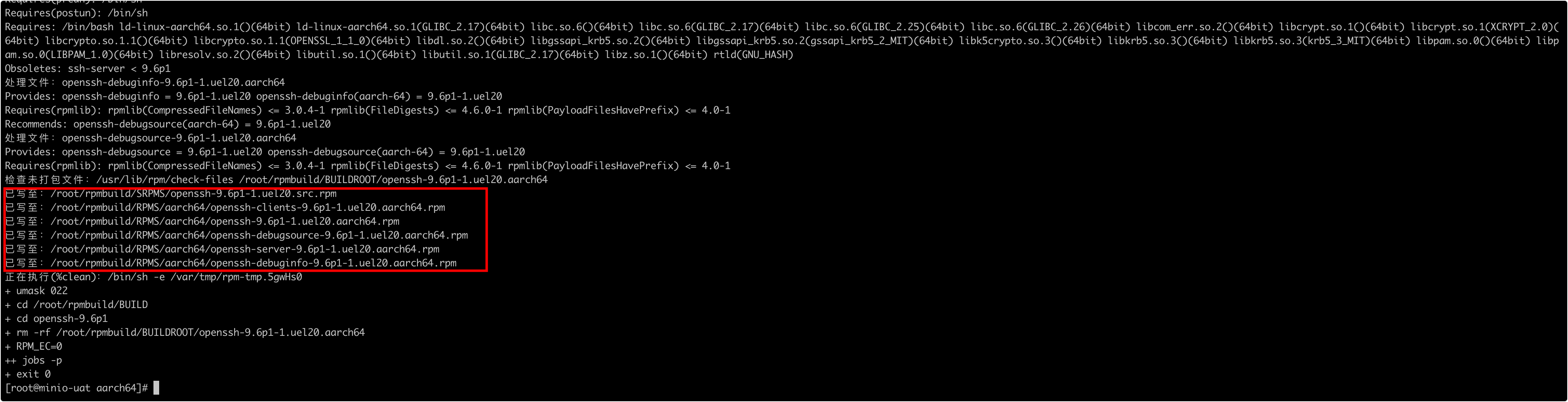
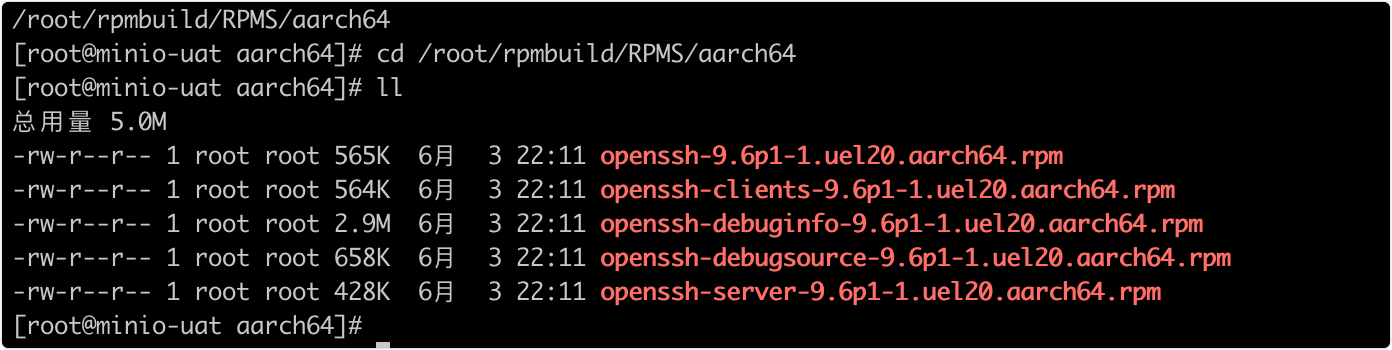
进入打包后的rpm包目录,将相关的包上传到需要升级的服务器安装即可
cd /root/rpmbuild/RPMS/aarch64
三、安装升级OpenSSH
正常我们安装openssh-9.6p1-1.uel20.aarch64.rpm、openssh-clients-9.6p1-1.uel20.aarch64.rpm、openssh-server-9.6p1-1.uel20.aarch64.rpm三个包即可,将这三个包上传至目标服务器进行安装
scp openssh-9.6p1-1.uel20.aarch64.rpm openssh-clients-9.6p1-1.uel20.aarch64.rpm openssh-server-9.6p1-1.uel20.aarch64.rpm uat90:~/
1、安装OpenSSH
注意:安装前先进行备份,安装过程如果失败,容易造成无法再通过ssh连接,建议安装一个telnet保持长链接,同时建议看两个以上终端连接上再进行升级,以免安装失败无法恢复sshd服务正常
1.1、停用和卸载旧版本sshd服务
查看当前版本
ssh -V

rpm -qa | grep openssh
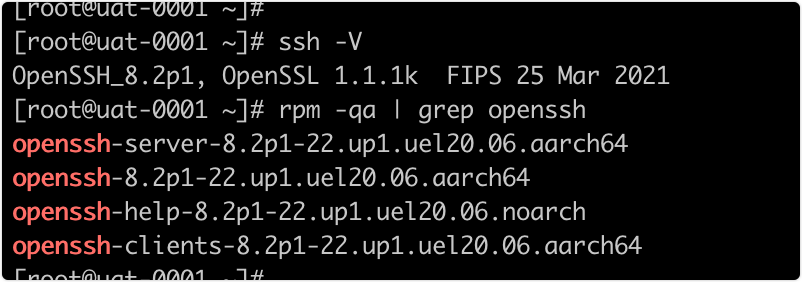
卸载当前版本
# 停用
systemctl stop sshd
# 卸载当前安装版本
rpm -e --nodeps openssh-server openssh-clients openssh openssh-help
1.2、安装新版本
注意:安装前先进行备份,安装过程如果失败,容易造成无法再通过ssh连接,建议安装一个telnet保持长链接,同时建议看两个以上终端连接上再进行升级,以免安装失败无法恢复sshd服务正常
rpm -Uvh --oldpackage --nodeps openssh-9.6p1-1.uel20.aarch64.rpm openssh-clients-9.6p1-1.uel20.aarch64.rpm openssh-server-9.6p1-1.uel20.aarch64.rpm

1.3、修改配置
vim /etc/ssh/sshd_config
PasswordAuthentication yes
UsePAM no
批量配置添加
可以执行如下命令将所有配置追加到/etc/ssh/sshd_config配置中
cat >> /etc/ssh/sshd_config << EOF
# ------------升级脚本添加的安全配置--------------
# 安全增强
StrictModes yes
IgnoreRhosts yes
HostbasedAuthentication no
PermitUserEnvironment no
ClientAliveCountMax 0
AllowTcpForwarding no
AllowAgentForwarding no
GatewayPorts no
PermitTunnel no

# 认证配置
PermitRootLogin yes
PasswordAuthentication yes
UsePAM yes # 启用 PAM
PermitEmptyPasswords no
PubkeyAuthentication yes

# 加密配置(保持原有安全设置)
KexAlgorithms curve25519-sha256,curve25519-sha256@libssh.org,diffie-hellman-group-exchange-sha256
Ciphers aes128-ctr,aes256-ctr,aes128-gcm@openssh.com,aes256-gcm@openssh.com
MACs hmac-sha2-512,hmac-sha2-512-etm@openssh.com,hmac-sha2-256,hmac-sha2-256-etm@openssh.com,umac-128-etm@openssh.com,umac-128@openssh.com
PubkeyAcceptedKeyTypes ssh-ed25519,ssh-ed25519-cert-v01@openssh.com,rsa-sha2-256,rsa-sha2-512

# 日志与版本信息
LogLevel INFO  # 生产环境建议使用 INFO
#Banner /etc/issue.net
#Banner none
VersionAddendum none

# 连接设置
Protocol 2
LoginGraceTime 60
IgnoreUserKnownHosts yes
EOF
执行如下配置将兼容配置添加到/etc/pam.d/sshd,不添加使用默认配置的话密码登录时会报错提示找不到pam_stack.so
cat > /etc/pam.d/sshd << EOF
#%PAM-1.0
auth       substack     password-auth
auth       include      postlogin
account    required     pam_sepermit.so
account    required     pam_nologin.so
account    include      password-auth
password   include      password-auth
# pam_selinux.so close should be the first session rule
session    required     pam_selinux.so close
session    required     pam_loginuid.so
# pam_selinux.so open should only be followed by sessions to be executed in the user context
session    required     pam_selinux.so open env_params
session    required     pam_namespace.so
session    optional     pam_keyinit.so force revoke
session    optional     pam_motd.so
session    include      password-auth
session    include      postlogin
EOF
检测配置是否正确
如下命令无输出不报错则表示配置正确没有问题✔
sshd -t
1.4、启动sshd
systemctl start sshd

systemctl status sshd
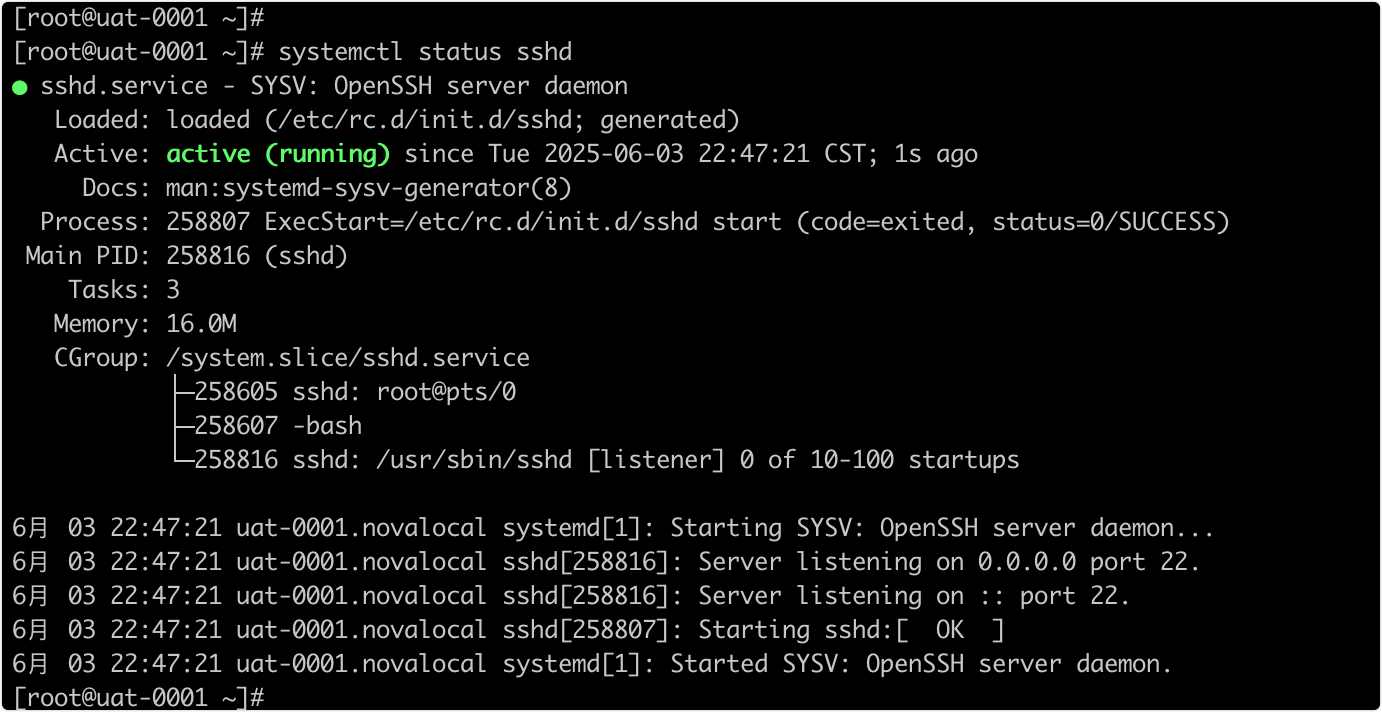
1.5、检查版本
检查版本,从其他机器测试登录是否正常
ssh -V

至此完成统信UOS操作系统aarch64自制OpenSSH的rpm包从8.2p1到9.6p1版本升级
附、下载rpm资源包安装
如果你的系统刚好是统信uel20.aarch64,同时OpenSSH是9.6p1以下版本,可以直接下载我编译好的rpm安装包

下载openssh-9.6p1-1.uel20.aarch64-rpm安装包.zip,包中内容如下,安装包中包含了一键安装升级脚本
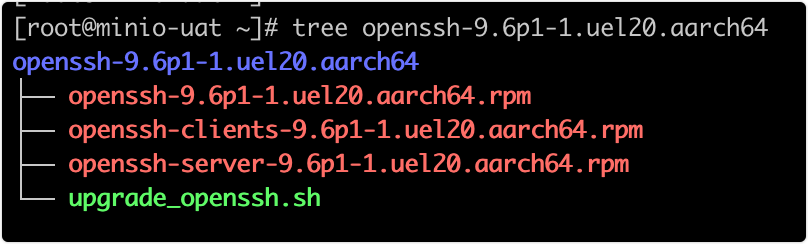
upgrade_openssh.sh升级脚本
#!/bin/bash
# OpenSSH 升级脚本
# 适用于 aarch64 架构,升级安装 OpenSSH 至 9.6p1
# 颜色定义
RED='[0;31m'
GREEN='[0;32m'
YELLOW='[0;33m'
NC='[0m' # 恢复默认颜色
# 日志函数
log() {
echo -e "[$(date '+%Y-%m-%d %H:%M:%S')] $1"
}
# 错误处理函数
handle_error() {
log "${RED}错误: $1${NC}"
exit 1
}
# 确认函数
confirm() {
read -p "$1 [y/N] " response
case "$response" in
[yY][eE][sS]|[yY])
true
;;
*)
false
;;
esac
}
# 版本比较函数
version_compare() {
# 提取版本号(如 9.6p1)
local current=$(echo "$1" | grep -oP 'OpenSSH_K[^,]+')
local target="9.6p1"
log "当前版本: $current"
log "目标版本: $target"
# 比较主版本号
local current_major=$(echo "$current" | grep -oP '^d+.d+')
local target_major=$(echo "$target" | grep -oP '^d+.d+')
if (( $(echo "$current_major < $target_major" | bc -l) )); then
return 0 # 需要升级
elif (( $(echo "$current_major > $target_major" | bc -l) )); then
return 1 # 无需升级
else
# 主版本相同,比较次要版本
local current_minor=$(echo "$current" | grep -oP 'pd+$')
local target_minor=$(echo "$target" | grep -oP 'pd+$')
if [[ "$current_minor" < "$target_minor" ]]; then
return 0 # 需要升级
else
return 1 # 无需升级
fi
fi
}
# 主函数
main() {
log "${YELLOW}开始 OpenSSH 升级脚本${NC}"
# 检查是否为root用户
if [ "$(id -u)" -ne 0 ]; then
handle_error "请使用root用户运行此脚本"
fi
# 检查系统架构
ARCH=$(uname -m)
if [ "$ARCH" != "aarch64" ]; then
log "${YELLOW}警告: 检测到架构为 $ARCH,此脚本专为 aarch64 设计${NC}"
if ! confirm "是否继续执行?"; then
log "${YELLOW}脚本已取消${NC}"
exit 0
fi
fi
# 保存当前目录
CURRENT_DIR=$(pwd)
# 创建工作目录
WORK_DIR="/opt/openssh-upgrade"
mkdir -p "$WORK_DIR" || handle_error "无法创建工作目录 $WORK_DIR"
cd "$WORK_DIR" || handle_error "无法进入工作目录 $WORK_DIR"
log "${GREEN}==== 步骤 1: 查看当前 OpenSSH 版本 ====${NC}"
CURRENT_SSHD=$(sshd -V 2>&1 | head -1)
if [[ -z "$CURRENT_SSHD" ]]; then
log "${YELLOW}未找到已安装的 OpenSSH,将进行全新安装${NC}"
else
log "当前安装的 OpenSSH 版本:"
log "$CURRENT_SSHD"
# 验证配置
if ! sshd -t 2>/dev/null; then
log "${YELLOW}当前 OpenSSH 配置验证失败,升级后需检查配置${NC}"
fi
# 版本比较
if version_compare "$CURRENT_SSHD"; then
log "${GREEN}当前版本低于 9.6p1,继续升级${NC}"
else
log "${YELLOW}当前版本已大于或等于 9.6p1,无需升级${NC}"
log "${YELLOW}当前版本: $CURRENT_SSHD${NC}"
exit 0
fi
fi
if ! confirm "是否继续进行升级?"; then
log "${YELLOW}脚本已取消${NC}"
exit 0
fi
log "${GREEN}==== 步骤 2: 卸载当前 OpenSSH ====${NC}"
log "停止 sshd 服务..."
systemctl stop sshd || log "${YELLOW}无法停止 sshd 服务,可能未运行${NC}"
log "卸载 OpenSSH 包..."
rpm -e --nodeps openssh-server openssh-clients openssh openssh-help 2>/dev/null || log "${YELLOW}卸载现有 OpenSSH 包失败或包不存在${NC}"
log "${GREEN}==== 步骤 3: 安装新的 OpenSSH ====${NC}"
RPM_DIR="$CURRENT_DIR" # 假设RPM包在当前目录
RPM_FILES=(
"openssh-9.6p1-1.uel20.aarch64.rpm"
"openssh-clients-9.6p1-1.uel20.aarch64.rpm"
"openssh-server-9.6p1-1.uel20.aarch64.rpm"
)
# 检查RPM文件是否存在
MISSING_RPMS=()
for file in "${RPM_FILES[@]}"; do
if [ ! -f "$RPM_DIR/$file" ]; then
MISSING_RPMS+=("$file")
fi
done
if [ ${#MISSING_RPMS[@]} -gt 0 ]; then
log "${RED}错误: 以下RPM文件不存在:${NC}"
for file in "${MISSING_RPMS[@]}"; do
log " - $file"
done
handle_error "请确保RPM文件在 $RPM_DIR 目录中"
fi
log "安装新的 OpenSSH 包..."
rpm -Uvh --oldpackage --nodeps "$RPM_DIR/"openssh-*.rpm || handle_error "安装 OpenSSH RPM 包失败"
log "${GREEN}==== 步骤 4: 修改 SSH 配置 ====${NC}"
SSH_CONFIG="/etc/ssh/sshd_config"
BACKUP_CONFIG="$SSH_CONFIG.bak.$(date '+%Y%m%d%H%M%S')"
log "备份现有配置文件到 $BACKUP_CONFIG"
cp "$SSH_CONFIG" "$BACKUP_CONFIG" || handle_error "无法备份 SSH 配置文件"
log "追加新配置到 $SSH_CONFIG"
cat >> "$SSH_CONFIG" << EOF
# ------------升级脚本添加的安全配置--------------
# 安全增强
StrictModes yes
IgnoreRhosts yes
HostbasedAuthentication no
PermitUserEnvironment no
ClientAliveCountMax 0
AllowTcpForwarding no
AllowAgentForwarding no
GatewayPorts no
PermitTunnel no
# 认证配置
PermitRootLogin yes
PasswordAuthentication yes
UsePAM yes # 启用 PAM
PermitEmptyPasswords no
PubkeyAuthentication yes
# 加密配置(保持原有安全设置)
KexAlgorithms curve25519-sha256,curve25519-sha256@libssh.org,diffie-hellman-group-exchange-sha256
Ciphers aes128-ctr,aes256-ctr,aes128-gcm@openssh.com,aes256-gcm@openssh.com
MACs hmac-sha2-512,hmac-sha2-512-etm@openssh.com,hmac-sha2-256,hmac-sha2-256-etm@openssh.com,umac-128-etm@openssh.com,umac-128@openssh.com
PubkeyAcceptedKeyTypes ssh-ed25519,ssh-ed25519-cert-v01@openssh.com,rsa-sha2-256,rsa-sha2-512
# 日志与版本信息
LogLevel INFO # 生产环境建议使用 INFO
#Banner /etc/issue.net
#Banner none
VersionAddendum none
# 连接设置
Protocol 2
LoginGraceTime 60
IgnoreUserKnownHosts yes
EOF
log "添加配置到 /etc/pam.d/sshd"
cat > /etc/pam.d/sshd << EOF
#%PAM-1.0
auth substack password-auth
auth include postlogin
account required pam_sepermit.so
account required pam_nologin.so
account include password-auth
password include password-auth
# pam_selinux.so close should be the first session rule
session required pam_selinux.so close
session required pam_loginuid.so
# pam_selinux.so open should only be followed by sessions to be executed in the user context
session required pam_selinux.so open env_params
session required pam_namespace.so
session optional pam_keyinit.so force revoke
session optional pam_motd.so
session include password-auth
session include postlogin
EOF
log "${GREEN}==== 步骤 5: 启动并验证 SSH ====${NC}"
log "启动 sshd 服务..."
systemctl start sshd || handle_error "启动 sshd 服务失败"
log "检查服务状态..."
systemctl status sshd --no-pager || log "${YELLOW}sshd 服务状态检查失败,但服务可能仍在运行${NC}"
log "验证升级后的版本..."
sshd -t || handle_error "升级后的 OpenSSH 配置验证失败"
log "${GREEN}==== 步骤 6: 检查并设置开机自启动 ====${NC}"
if [[ $(systemctl is-enabled sshd) != "enabled" ]]; then
log "${YELLOW}sshd 服务未设置开机自启动,正在设置...${NC}"
systemctl enable sshd || log "${RED}警告: 无法设置 sshd 开机自启动,请手动设置${NC}"
else
log "${GREEN}sshd 服务已设置开机自启动${NC}"
fi
log "重启 sshd 服务..."
systemctl restart sshd || handle_error "重启 sshd 服务失败"
log "${GREEN}==== OpenSSH 升级完成 ====${NC}"
log "新版本: $(sshd -V 2>&1 | head -1)"
log "配置文件: $SSH_CONFIG"
log "备份文件: $BACKUP_CONFIG"
log "${GREEN}请确保能够通过 SSH 连接到服务器后再关闭当前会话${NC}"
log "${YELLOW}脚本参考:http://blog.csdn.net/UberSoldier/article/details/148410819${NC}"
}
# 执行主函数
main